[shawnyan@rocky9 ~]$ cat /etc/redhat-release
Rocky Linux release 9.2 (Blue Onyx)
[shawnyan@rocky9 ~]$ uname -a
Linux rocky9.shawnyan.cn 5.14.0-284.30.1.el9_2.x86_64 #1 SMP PREEMPT_DYNAMIC Sat Sep 16 09:55:41 UTC 2023 x86_64 x86_64 x86_64 GNU/Linux
[shawnyan@rocky9 ~]$
[shawnyan@rocky9 ~]$ gcc --version
gcc (GCC) 11.3.1 20221121 (Red Hat 11.3.1-4)
Copyright (C) 2021 Free Software Foundation, Inc.
This is free software; see the source for copying conditions.  There is NO
warranty; not even for MERCHANTABILITY or FITNESS FOR A PARTICULAR PURPOSE.

[shawnyan@rocky9 ~]$ cmake --version
cmake version 3.20.2

CMake suite maintained and supported by Kitware (kitware.com/cmake).
[shawnyan@rocky9 ~]$ top
top - 15:28:57 up 12 days,  1:23,  2 users,  load average: 0.01, 0.03, 0.00
Tasks: 272 total,   1 running, 271 sleeping,   0 stopped,   0 zombie
%Cpu0  :  0.0 us,  0.3 sy,  0.0 ni, 99.0 id,  0.0 wa,  0.3 hi,  0.3 si,  0.0 st
%Cpu1  :  0.0 us,  0.3 sy,  0.0 ni, 99.7 id,  0.0 wa,  0.0 hi,  0.0 si,  0.0 st
MiB Mem :   3623.0 total,    818.1 free,    947.4 used,   2131.4 buff/cache
MiB Swap:   4020.0 total,   3158.1 free,    861.9 used.   2675.6 avail Mem
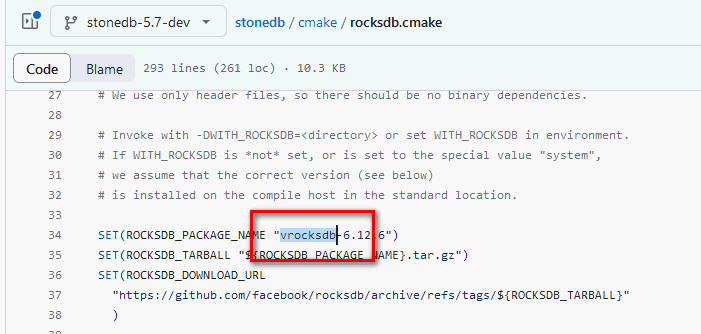
-- Local rocksdb dir /data/stonedb-stonedb-5.7-dev/release/rocksdb-6.12.6 found ROCKSDB_INCLUDE_DIR:/data/stonedb-stonedb-5.7-dev/release/rocksdb-6.12.6 -- Found /data/stonedb-stonedb-5.7-dev/release/rocksdb-6.12.6/include/rocksdb/version.h -- current ROCKSDB_VERSION_NUMBER is #define ROCKSDB_MAJOR 6.#define ROCKSDB_MINOR 12 -- current ROCKSDB_MAJOR_VERSION is: 6, ROCKSDB_MAJOR_VERSION:12 -- ROCKSDB_INCLUDE_DIR /data/stonedb-stonedb-5.7-dev/release/rocksdb-6.12.6
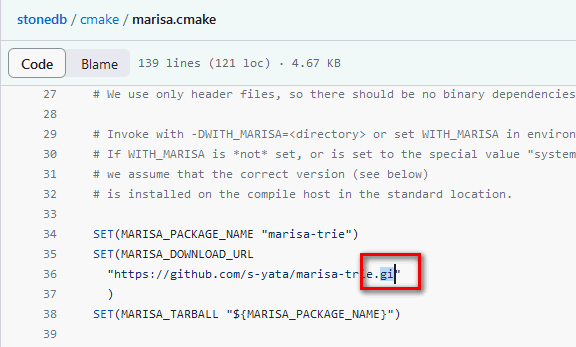
marisa-trie 下载链接
StoneDB 依赖“玛丽莎”,同上,需要提前下载源码包。
1 2 3 4 5 6 7 8 9 10 11 12 13 14 15
found MARISA_INCLUDE_DIR:MARISA_INCLUDE_DIR-NOTFOUND
-- Looked for include/marisa.h in  and
-- MARISA_INCLUDE_DIR MARISA_INCLUDE_DIR-NOTFOUND
-- LOCAL_MARISA_DIR
-- Could not find (the correct version of) marisa.
-- MySQL currently requires marisa-trie

CMake Error at cmake/marisa.cmake:59 (MESSAGE):
  You can download it, install it, then specify the marisa path with
  -DWITH_MARISA=<director>

  This CMake script will look for marisa in <directory>.
Call Stack (most recent call first):
  cmake/marisa.cmake:123 (COULD_NOT_FIND_MARISA)
  CMakeLists.txt:323 (INCLUDE)
...failed gcc.compile.c++ bin.v2/libs/python/build/gcc-gnu-11/release/link-static/threadapi-pthread/threading-multi/converter/builtin_converters.o... ...skipped <pbin.v2/libs/python/build/gcc-gnu-11/release/link-static/threadapi-pthread/threading-multi>libboost_python3.a(clean) for lack of <pbin.v2/libs/python/build/gcc-gnu-11/release/link-static/threadapi-pthread/threading-multi>converter/builtin_converters.o... ...skipped <pbin.v2/libs/python/build/gcc-gnu-11/release/link-static/threadapi-pthread/threading-multi>libboost_python3.a for lack of <pbin.v2/libs/python/build/gcc-gnu-11/release/link-static/threadapi-pthread/threading-multi>converter/builtin_converters.o... ...skipped <pstage/lib>libboost_python3.a for lack of <pbin.v2/libs/python/build/gcc-gnu-11/release/link-static/threadapi-pthread/threading-multi>libboost_python3.a... ...failed updating 2 targets... ...skipped 6 targets...
Cannot find appropriate system libraries for WITH_SSL=system. Make sure you have specified a supported SSL version. Valid options are : system (use the OS openssl library), yes (synonym for system), </path/to/custom/openssl/installation>
CMake Error at cmake/ssl.cmake:63 (MESSAGE): Please install the appropriate openssl developer package.