可能这次要换电脑了
年初的时候,简要介绍了 Oracle Linux 10 Preview 版:我的“Oracle Linux 10 高定版”待激活
6 月底,Oracle Linux 10 (以下简称 OL 10)已正式发布,可以下载使用。(Oracle Linux 完全免费,可放心下载使用)
OL 10 默认搭载 UEK 和 RHCK 两个内核:
kernel-uek-6.12.0-100.28.2 (UEK 8U1)
kernel-6.12.0-55.9.1.0.1 (Red Hat Compatible Kernel (RHCK))
安装完成并更新系统,查看更新后的内核版本:
1
2
3
[root@localhost ~]# uname -a Linux ol10.shawnyan.cn 6.12.0-100.28.2.el10uek.x86_64 #1 SMP PREEMPT_DYNAMIC Mon May 19 19:28:24 PDT 2025 x86_64 GNU/Linux [root@localhost ~]#
不过需要注意的是,从 OL 10 开始,需要 CPU 支持 x86-64-v3,否则无法安装。
支持 x86-64-v3 的 CPU
x86-64 微架构 x86-64-v3 级别主要惠及那些不包含针对现代 CPU 微架构专门实现的数值应用(例如数据科学)。总体而言,x86-64-v3 的改进带来了以下改进:
AVX 和 AVX2 指令集将矢量寄存器的宽度从 128 位增加到 256 位,并增加了许多新的矢量运算。
支持融合乘加 (FMA) 指令,该指令将乘法和加法合并为一个运算,以无限精度计算中间结果。
VEX 编码为许多包含第二个或第三个(目标)操作数的现有指令添加了变体。使用这些指令变体,输入操作数不再进行破坏性更新。这减少了对显式移动指令的需求,从而提高了代码密度并降低了指令缓存压力。
标量寄存器新增了许多位操作,包括并行位存入和位提取。
矢量指令的增强功能看起来尤其令人期待,因为从 GCC 12 版本开始,支持在 -O2(默认优化级别)下进行自动矢量化。
如何判断 CPU 是否支持 x86-64-v3
方法一:检查动态类库
1
2
3
4
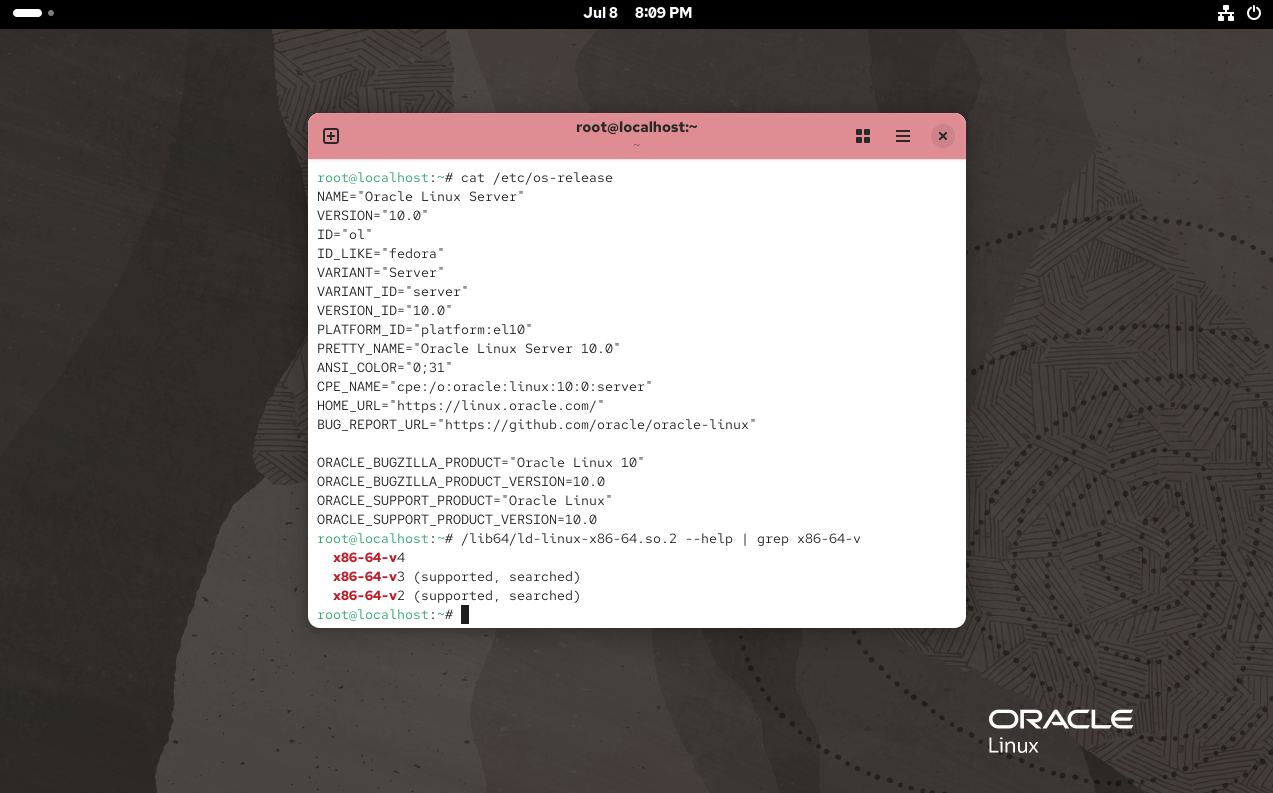
[shawnyan@ol10 ~]$ /lib64/ld-linux-x86-64.so.2 --help | grep ' x86-64-v' x86-64-v4 x86-64-v3 (supported, searched) x86-64-v2 (supported, searched)
说明当前机器的 CPU 支持 x86-64-v3。
方法二:检查 CPU 标志
如果你的系统不支持方法一,可以尝试这个“传统”的方法。
1
2
3
[shawnyan@ol10 ~]$ lscpu | egrep -i 'avx|bmi|f16c|movbe' Flags: fpu vme de pse tsc msr pae mce cx8 apic sep mtrr pge mca cmov pat pse36 clflush mmx fxsr sse sse2 ss syscall nx pdpe1gb rdtscp lm constant_tsc arch_perfmon rep_good nopl xtopology tsc_reliable nonstop_tsc cpuid tsc_known_freq pni pclmulqdq ssse3 fma cx16 pcid sse4_1 sse4_2 x2apic movbe popcnt tsc_deadline_timer aes xsave avx f16c rdrand hypervisor lahf_lm abm 3dnowprefetch ssbd ibrs ibpb stibp ibrs_enhanced fsgsbase tsc_adjust bmi1 avx2 smep bmi2 erms invpcid rdseed adx smap clflushopt clwb sha_ni xsaveopt xsavec xgetbv1 xsaves user_shstk avx_vnni arat umip pku ospke gfni vaes vpclmulqdq rdpid movdiri movdir64b fsrm md_clear serialize flush_l1d arch_capabilities [shawnyan@ol10 ~]$
x86-64-v3 级别需要 CPU 支持包括 AVX、AVX2、BMI1、BMI2、F16C、FMA、LZCNT、MOVBE 和 OSXSAVE 在内的指令集。
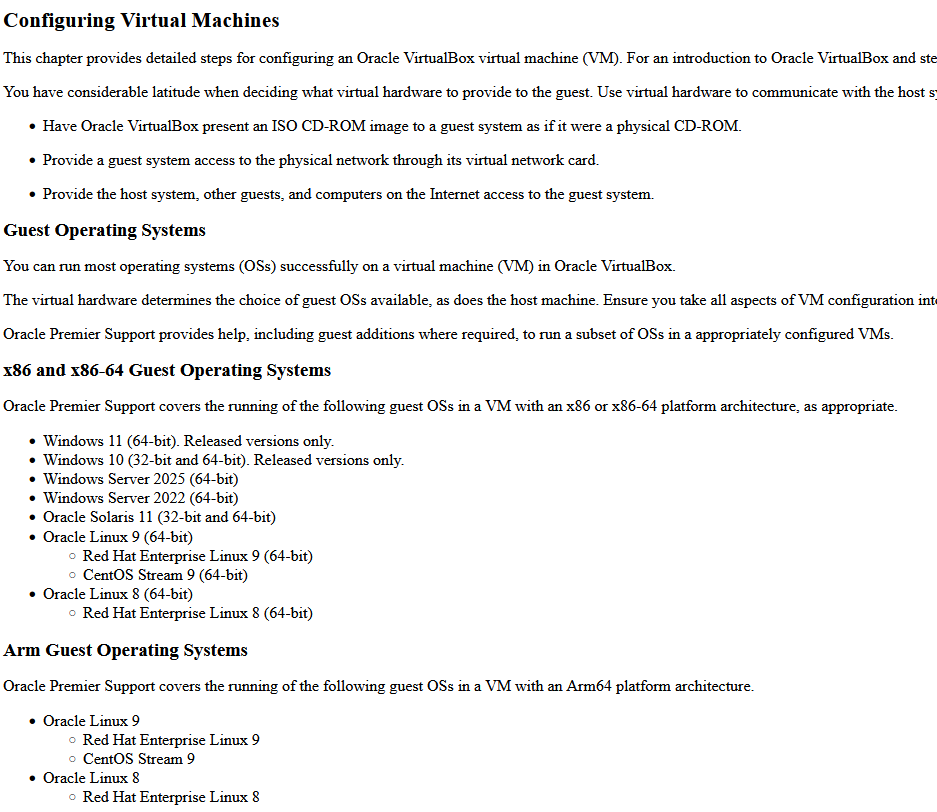
VBOX 尚不支持 Oracle Linux 10
在群(发消息到公众号#少安事务所 可找到入口)里交流时发现,即便是 CPU 支持 v3,也可能出现 OL 10 安装不上的情况。
对比发现是虚拟化软件导致的,VMware 可以正常安装 OL 10,但是 VirtualBox 尚不支持。
VBox 的文档中记录了最新版本 7.1 支持内核 kernel 6.15,以及 OL 9/8/7/6/5,并没有明确记录支持 OL 10。
结果就真的不支持 😅
哪些 Intel CPU 支持 10
Oracle Linux 的文档中提示了支持以下平台:
Intel® 64-bit (x86_64) (x86-64-v3)
AMD 64-bit (x86_64) (x86-64-v3)
64-bit Arm (aarch64) (Arm v8.0-A)
Arm 平台仅使用 Unbreakable Enterprise Kernel Release (UEK) 运行。
但是并没有列举具体支持哪些 CPU 型号。
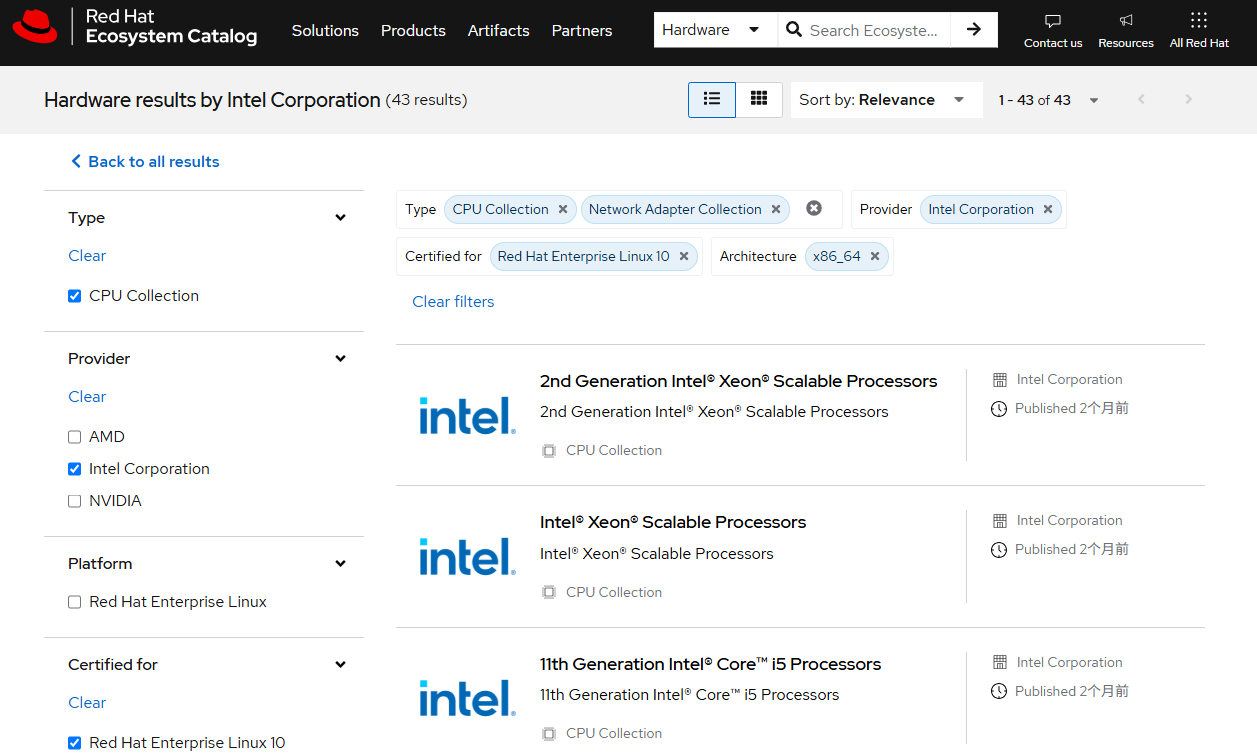
为了进一步确认信息,我们最终在红帽的官网找到了一个清单,列举了哪些 Intel x86_64 架构的 CPU 支持 RHEL 10。
包括第 7 代英特尔酷睿处理器往上在内的 43 款系列。
https://catalog.redhat.com/en/search?rows=50&searchType=Hardware&certified_architectures=x86_64&certified_versions=Red+Hat+Enterprise+Linux+10&partnerName=Intel+Corporation&type=CPU+Collection|Network+Adapter+Collection
在 OL 10 上安装 MySQL 8.4
Oracle Linux 10 默认提供 MySQL 的安装包,可使用 dnf 命令直接安装。
1
2
3
4
5
6
7
8
9
10
11
12
13
14
15
16
17
18
19
20
21
22
[root@ol10 ~]# dnf install mysql8.4-server Last metadata expiration check: 0:00:34 ago on Tue 08 Jul 2025 11:44:38 PM CST. Dependencies resolved. ================================================================================================= Package Arch Version Repository Size ================================================================================================= Installing: mysql8.4-server x86_64 8.4.4-2.el10 ol10_appstream 18 M Installing dependencies: mariadb-connector-c-config noarch 3.4.4-1.el10 ol10_baseos_latest 8.8 k mecab x86_64 0.996-9.el10 ol10_appstream 390 k mysql-selinux noarch 1.0.13-2.el10 ol10_appstream 37 k mysql8.4 x86_64 8.4.4-2.el10 ol10_appstream 2.4 M mysql8.4-common noarch 8.4.4-2.el10 ol10_appstream 102 k mysql8.4-errmsg noarch 8.4.4-2.el10 ol10_appstream 545 k protobuf-lite x86_64 3.19.6-11.el10 ol10_appstream 262 k Transaction Summary ================================================================================================= Install 8 Packages ... Complete!
启动 MySQL 数据库。
1
2
3
4
5
6
7
8
9
10
11
12
13
14
15
16
17
18
19
20
[root@ol10 ~]# systemctl start mysqld [root@ol10 ~]# systemctl status mysqld ● mysqld.service - MySQL 8.4 database server Loaded: loaded (/usr/lib/systemd/system/mysqld.service; disabled; preset: disabled) Active: active (running) since Tue 2025-07-08 23:46:49 CST; 4s ago Invocation: ad197f9b5bfb4f4b81166282deb5ea3f Process: 3193 ExecStartPre=/usr/libexec/mysql-check-socket (code=exited, status=0/SUCCESS) Process: 3216 ExecStartPre=/usr/libexec/mysql-prepare-db-dir mysqld.service (code=exited, st> Main PID: 3290 (mysqld) Status: "Server is operational" Tasks: 35 (limit: 47682) Memory: 442M (peak: 454.9M) CPU: 2.078s CGroup: /system.slice/mysqld.service └─3290 /usr/libexec/mysqld --basedir=/usr Jul 08 23:46:45 ol10.shawnyan.cn systemd[1]: Starting mysqld.service - MySQL 8.4 database server> Jul 08 23:46:45 ol10.shawnyan.cn mysql-prepare-db-dir[3216]: Initializing MySQL database Jul 08 23:46:49 ol10.shawnyan.cn systemd[1]: Started mysqld.service - MySQL 8.4 database server. [root@ol10 ~]#
MySQL 以非安全方式初始化,默认 root 密码为空,可直接连接到数据库。
1
2
3
4
5
6
7
8
9
10
11
12
13
14
15
16
17
18
19
20
21
22
23
24
[root@ol10 ~]# mysql -uroot Welcome to the MySQL monitor. Commands end with ; or \g. Your MySQL connection id is 8 Server version: 8.4.4 Source distribution Copyright (c) 2000, 2025, Oracle and/or its affiliates. Oracle is a registered trademark of Oracle Corporation and/or its affiliates. Other names may be trademarks of their respective owners. Type 'help;' or '\h' for help. Type '\c' to clear the current input statement. mysql> show variables like 'version%'; +-------------------------+---------------------+ | Variable_name | Value | +-------------------------+---------------------+ | version | 8.4.4 | | version_comment | Source distribution | | version_compile_machine | x86_64 | | version_compile_os | Linux | | version_compile_zlib | 1.3.1.zlib-ng | +-------------------------+---------------------+ 5 rows in set (0.00 sec)
Have a nice day ~ ☕
🌻 近期内容 ▼
👉 这里有得聊
如果对国产基础软件(操作系统、数据库、中间件)、AI、Vibe Coding、OpenClaw 、Hermes Agent 等感兴趣,可以加群一起聊聊。关注微信公众号:(少安事务所),后台回复[群],即可看到入口。如果这篇文章为你带来了灵感或启发,请帮忙『点赞、推荐、转发』吧,感谢!ღ( ´・ᴗ・` )~
Author:
Shawn Yan
Link:
https://shawnyan.cn/2025/linux/oracle-ace-worldwide-has-exceeded-600/index.html
License:
All articles on this site are original unless otherwise stated. Please indicate the source when reprinting!